Add to ToolPalette
- You can save the current texture settings in the
ToolPalette for future use.
-
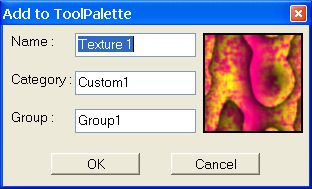
- Preview Image
-
Displays the texture that will appear in the ToolPalette.
-
-
Name
-
Enter a name for this texture setting that will remind you of what
it does or when to use it.
-
-
Category
-
Select the Category which contains the Group.
-
-
Group
-
Select a Group within this Category you want to save the texture in.