Free Transform
-
Menu -> Image -> Free Transform

-
This command let you apply the transformations to a layer. You can
scale horizontally, vertically, or both horizontally and vertically.
You can turn a layer around a reference point. By default, this
point is at the center of the layer; however, you can move it to
another location. You can also skew while slanting a layer
vertically and horizontally.
-
-
-
Do one or more of the following:
 To scale by dragging, drag a handle. Press Shift as you drag a
corner handle to scale proportionately.
To scale by dragging, drag a handle. Press Shift as you drag a
corner handle to scale proportionately.
-
To distort relative to the center point of the bounding border,
press Alt, and drag a handle.
-
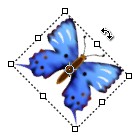
To rotate by dragging, move the pointer outside the bounding border
(it becomes a curved, two-sided arrow), and then drag. Press Shift
to constrain the rotation to 15° increments.
-
To rotate numerically, enter degrees in the angle rotation text box
in the options bar.
-
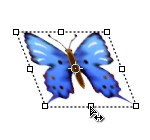
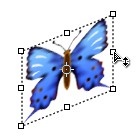
To skew, press Ctrl, and drag a side handle. When positioned over a
side handle, the pointer becomes a white arrowhead with a small
double arrow.
-
To skew numerically, enter percents in the H (horizontal skew) and V
(vertical skew) text boxes in the options bar.
-
To change the reference point, click the button
 and choose an option in the menu. You can also drag the pivot point
with the mouse.
and choose an option in the menu. You can also drag the pivot point
with the mouse. -
To reset all transformation parameters, click the Reset button
 in the options bar.
 -
To validate the transformation, click the Validate button
 in the options bar.
 -
To cancel the transformation, click the Cancel button
 in the options bar.
-
-
Rotation, Horizontal skew and Vertical skew.
-