Resize
Image
Menu -> Image -> Resize Image
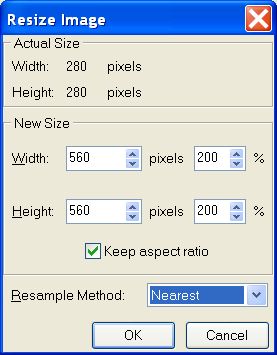
- Width and Height
-
The width and height of the new size of image in pixel (up to
600x600 with the Lite edition, up to 4000x4000
with the 32 bits Studio edition and up to 15000x15000
with the 64 bits Studio edition) is also shown in percentage.
-
Aspect ratio is the relationship of the image's width to height. If
you want to retain the original proportions when resizing, select
the check box "Keep aspect ratio".
-
-
Resample Method
-
You can choose the method image resampling.
 Nearest, is a less precise method. Recommended for use with images
containing non-anti-aliased edges or to preserve hard edges.
Nearest, is a less precise method. Recommended for use with images
containing non-anti-aliased edges or to preserve hard edges.-
Linear, is a medium quality method. Recommended for to reduce the
size of an image.
-
Smooth, is a precise method, but produces very blurred edges.
-
Anti-aliased, is a very precise method, resulting in the smoothest
tonal gradations. Use this resample when you enlarge an image.
- Only the background
is resized. For to resize the layers, flatten them at first.