Filters (Studio 32 bits only)
- Menu
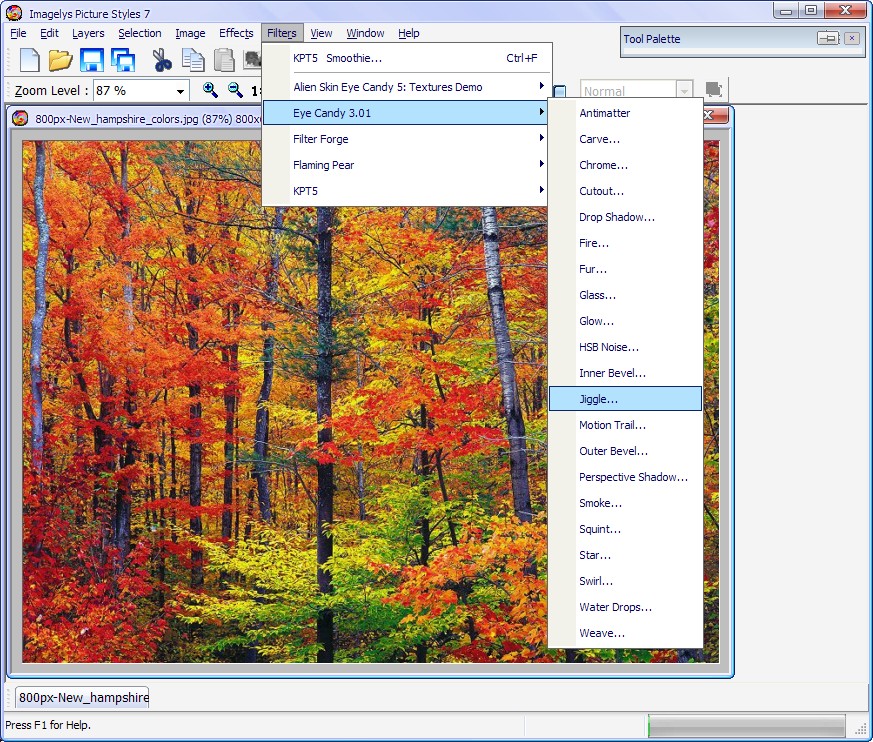
-> Filters -> Choose a filter into the submenus
-
-
Plug-in modules are software programs developed by Imagelys and by
other software developers in conjunction with the 8bf
specifications of Adobe Systems to add features to Imagelys Picture
Styles. A number of special-effects plug-ins come with your program.
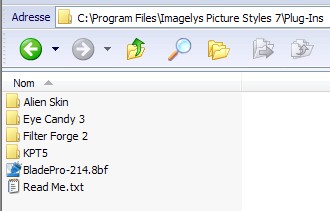
They are installed in folders inside the Imagelys Plug-Ins folder.
-
-
Once installed, plug-in modules appear as filters in the Filters
submenus. Imagelys Picture Styles 32 bits can accommodate a large
number of plug-ins.
-
-
To install a 8bf Adobe Systems plug-in 32 bits module, you
install copy of the module into the appropriate Plug-Ins folder in
the Imagelys Picture Styles 32 bits program folder. Make sure that
the files are uncompressed.
-
-
-
-
Install the 8bf Adobe Systems plug-in 32 bits modules into
the Plug-Ins folder in the Imagelys Picture Styles 32 bits program
folder.
-
-